
目次
何 は オートタグベスト?
実践方法
に するに有効 その タグ 検出方法
に 使用 GCPs と その タグ 検出最適化
オートタグ 検出
What are Autotags?
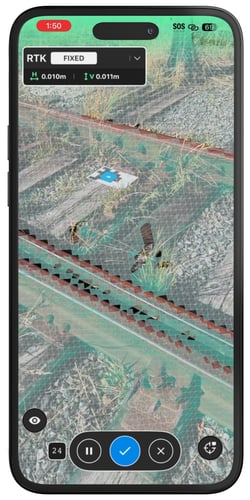
オートタグ は ターゲット それ PIX4Dcatch できる 自動的に 検出する そして マーク。 彼らは できる なれ 使用済み として 地面 コントロール ポイント (GCPs) または マニュアル ネクタイ ポイント (MTPs)、 手助けする 改善する プロジェクト さ正確 その間 削減 その 必要 ためのに マニュアル ポイント マーキング。
オートタグ できる なれ 組み合わせた と 1 セット の 知られている 座標 に 関数 として 地面 コントロール ポイント (GCPs)。 いつ 1 ポイント コレクション 含む 調査した 座標 は リンク済み に その オートタグ、 PIX4Dcatch 自動的に 関係者 それぞれ タグ と その 対応 座標、 マーク 彼ら、 そして おやつ 彼ら として 1 GCP。 もし いいえ 知られている 座標 は リンク済み に その オートタグ、 PIX4Dcatch 検討する 彼ら として マニュアル ネクタイ ポイント (MTPs) そして 使用 彼ら に 改善する 画像 校正 そして 再建。
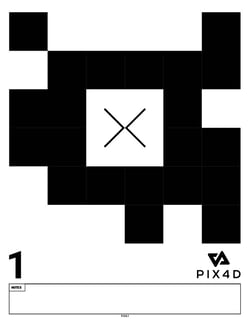
Autotags can be purchased or downloaded from the links below:
ヒント: 私たちは 推薦する 印刷 の上 4サイズ または 私たち レターサイズ 紙 ためのに 最適 互換。性 ためのに 耐久性、 印刷 オートタグ そして スティック 彼ら に 固い 表面 そのような として 薄い 合板 または プラスチック。 多くの 印刷 ショップ また オファー ビニール 印刷、 どれの は 耐候性。
Best Practices
Placement Guidelines
Proper Autotag placement is critical for accurate detection:
- Distribute Autotags evenly across the project area.
- Ensure Autotags are clean, flat, and not obstructed by shadows or objects.
- Avoid blurry images. Ensure each tag is clearly visible and sharp.
- Make sure tags are large enough to appear clearly in the captured images.
- 維持する 1 良い画像 オーバーラップ それで それぞれ タグ 現れる で 複数 画像。
- Avoid placing unused Autotags within view, as they may interfere with detection.
- Do not place Autotags at the very edges of the project area. They may not appear in enough images.
重要: PIX4Dcatch 現在 サポート 上 に 55 的個性 オートタグ、 それぞれ と 1 明確な 数値 辞接尾。
Distribution Example
Think of a project area as a table, with Autotags as its legs. Clustered legs make it unstable, while evenly spaced ones keep it balanced. For best results, distribute Autotags evenly across the area and, if possible, place one near the center to enhance model stability.
Recommended setup:
- 最小: 3 オートタグ (必須 ためのに 処理中)。
- 推奨: 5–10 オートタグ ためのに れ改善さた 正確さ。
回廊: オフセット その タグ 平行 その 長さ そして 場所 1 ペア で それぞれ 終わり。
How to enable the Tag Detection
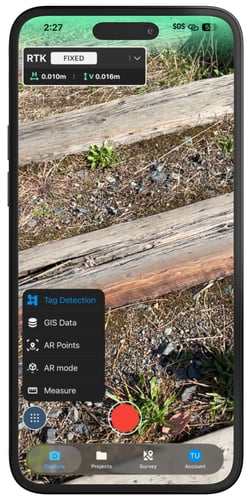
PIX4Dcatch できる 自動的に 検出する オートタグ その間 画像 捕獲 もし タグ 検出 は なりに有効ました。 化有効 これ 特徴 それなし 輸入 1 ポイント コレクション の GCPs 意思 作成する MTPs。
- の上 その PIX4Dcatch 家 スクリーン、 タップ 捕獲 で その 底。
- 前に 開始 に 捕獲 1 プロジェクト、 タップ
 その ツール アイコン で その 底 右 コーナー。
 - 選択
.png?width=20&height=20&name=Button%20(1).png) タグ 検出。
タグ 検出。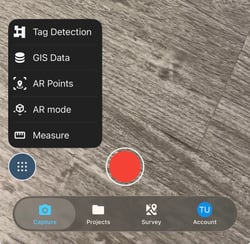
- するに有効 検出する オートタグ。
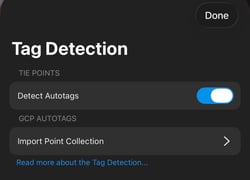
When enabled, the Tag Detection option will appear in blue during the capture.
How to use GCPs with the Tag Detection
で PIX4Dcatch、 1 セット の 地面 コントロール ポイント (GCPs) は 管理 を通して 1 ポイント コレクション。 ためのに オートタグ に なれ 使用済み として GCPs、 1 ポイント コレクション 含む GCPs と 知られている 座標 ならばしなけれない なれ 輸入 そして リンク済み に その オートタグ。
PIX4Dcatch できる なれ 使用済み に 捕獲 GCPs 直接 で その 分野、 または GCPs と 知られている 座標 できる なれ 輸入 の中へ 1 ポイント コレクション。 ためのに もっと 情報: どうやって に 輸入 そして マーク 地面 コントロール ポイント (GCPs) で PIX4Dcatch。
To enable the tag detection feature with GCPs, follow the steps below.
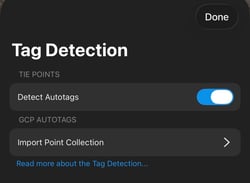
- 後 その タグ 検出 特徴 は 有効化、 タップ 輸入 ポイント コレクション。
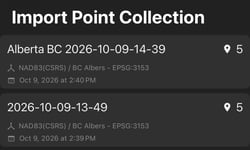
- Select a Point Collection from the list.
- 一度 輸入れさた、 タップ 終わり。
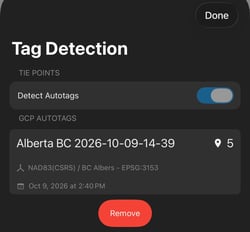
重要: マッチング その オートタグ は ベース の上 その 数値 辞接尾 の その ポイント 名前 で その ポイント コレクション。 PIX4Dcatch 意思 マッチ その 数値 辞接尾 の ポイント 名前 と その オートタグ 数字。 お願いします 確保する それ その ポイント 名前 終わり で その 同じ 番号 として その 番号 見える の上 その 自動タグ。
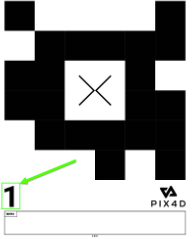
警告: その ポイント コレクション ならばしなけれない 持っている 1 投影 出力 CRS。
Example:
- ポイント名_1 通信 に オートタグ 01
- ポイント名_2 通信 に オートタグ 02
- ポイント名_3 通信 に オートタグ 03
During Capture
While moving around the site:
- PIX4Dcatch will mark detected Autotags in real-time.
- Tags with green labels indicate valid detections.
- Below the Signal Indicator dialog, the total number of successfully marked Autotags and the number of point entries in the Point Collection are displayed.
注記: A タグ ならばしなけれない なれ 見える で で 少しでも 三つ 画像 に なれ 使用済み で 処理中。
Optimizing Autotag Detection
After a capture, PIX4Dcatch gives the option to optimize Autotag detection. This step improves marker precision and strengthens the 3D model reconstruction. Autotag Detection can be optimized in two ways: during dataset capture or after project capture.
Optimizing autotag detection while capturing a dataset
注記: 最適化 は 自動的に 済み適用 に プロジェクト と 少ない よりも 500 画像 で 普通 解決。
PIX4Dcatch automatically optimizes Autotag detection during project processing. Enabling this option ensures improved accuracy without requiring manual intervention.
To configure automatic optimization when processing:
- On the PIX4Dcatch home screen, tap the user icon in the top-right corner.
- 下 設定、 タップ プロジェクト 設定。
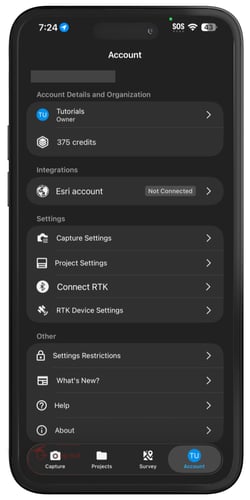
- 下 最適化する オートタグ いつ 処理、 タップ 聞く それぞれ 時間。
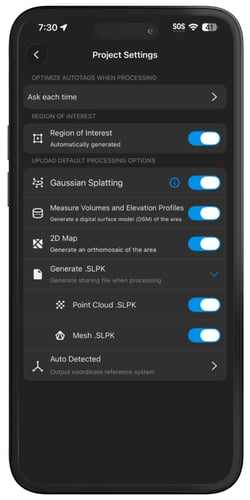
- Choose one of the following options:
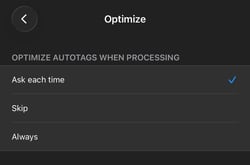
聞く それぞれ 時間: 画面 1 プロンプト 前に 最適化。
スキップ: する ない 最適化する いつ 処理中。
いつも: 自動的に 最適化する その上 処理中。
Optimizing autotag detection after capturing a dataset
- 開ける PIX4Dcatch そして タップ プロジェクト で その 底。
- Select the project for adding an annotation.
- で その トップ-右上 コーナー、 タップ
 その 点3つの アイコン。
 - 選択最適化

- A list of optimization options will appear. Select one or more options; multiple optimization tasks can be processed concurrently in a single optimization run:
- オートタグ 検出: する改善 その さ正確 の 3D モデル 再建。
- 深さ 配置: 助ける 取り除く ダブル 表面 で その 再建。
- Point Cloud (iOS with LiDAR only): Generates a point cloud from the captured data. If Point Cloud is selected, the two processing options will be available.
- 密集: 生成する 1 非常に 詳細 ポイント 雲 と 1 大きい 番号 の ポイント。 それ 必要 1 より長い 処理 時間 そして 含まれる 大きなより 詳細。
- スパース: 生成する 1 ライター ポイント 雲 と 少ない ポイント。 それ プロセス 早くもっと そして 含まれる 少ない 詳細。
4. Tap the Optimize icon .png?width=150&height=20&name=Button%20(6).png) .
.